
For agencies and managers
Run every client from one agency console.
Link client workspaces, work inside each with the right role, and report back under your own brand.
One full workspace for 30 days. No auto-renew. The agency console and team seats come with the Agency plan. AI credits and your own domain come with a paid plan.
- Each client in its own workspace
- Clients approve your access
- 0% platform fee on client sales
- No auto-renew, ever
Sample agency website, example data
- 0%
- Platform fee on your clients’ sales
- 7
- Workspace roles, including view-only for clients
- 25
- Team seats on the Agency plan
- 7 days
- To ask for a full refund of your first plan
See it for real
Click through real screens from a sample workspace. Every client workspace is a full workspace like this one. The agency console is drawn below with example data.
Track agency leads from first enquiry to signed client, with stages you can rename.
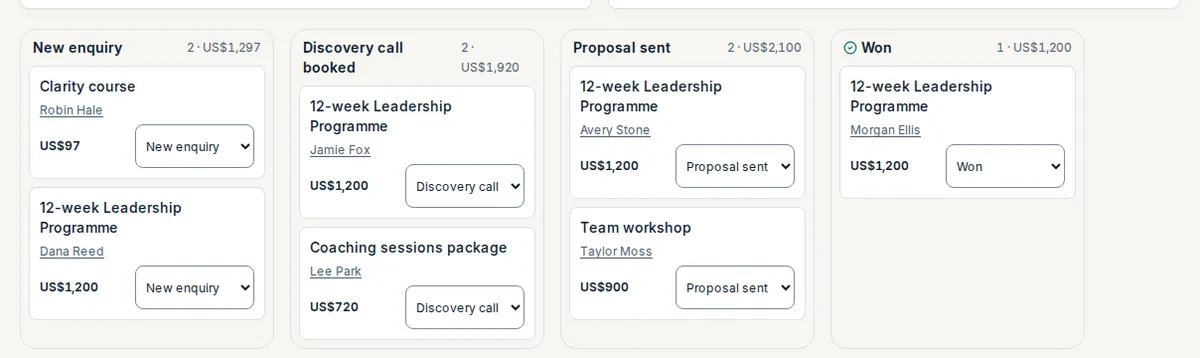
Sample workspace, example data
Build yours in minutes.
Start trial for USD 19Start 30-day trial for USD 19Sound familiar?
A new stack for every client.
Each client needs a site, email, a store and reporting, and every account is another login and another bill.
One slip shows a client someone else’s numbers.
Shared sheets and shared tools mix client data, and one wrong paste can expose it.
Reports are rebuilt by hand each month.
Pulling revenue and growth for each client into a document takes hours that nobody pays you for.
Gbeya gives each client a separate workspace and gives you one console over all of them.
Your clients keep their brand and you keep control
Each client workspace wears the client’s name. You work inside it with exactly the access its owner approved.
Their name, not ours
Each workspace shows its own name, logo and colours on its site, login page, customer portal and email. Gbeya branding is removed on every paid plan.
A workspace per client
Every client’s data lives in its own workspace, separated from every other at the database level.
Access you can explain
A client links you by approving your request, and you get the role you asked for. They can end the link at any time.
A client’s own domain comes with that workspace’s paid plan. The trial runs on a gbeya.com address.
Build what each client sells
The same engines run in every client workspace, so you learn one tool and deliver in all of them.
Courses and cohorts
Lessons, quizzes, drip release and certificates, or a cohort that starts on one date.
Your buyer gets: The client’s students learn under the client’s name, with a certificate they can prove.
Memberships and community
Paid or free tiers that gate courses and a private community with events.
Your buyer gets: Members join the client’s space, not a rented one.
Email and newsletters
Broadcasts, drip sequences and workflows, sent from the client’s own mailbox.
Your buyer gets: The client owns the list and can export it.
Downloads and a store
Sell files and templates with secure links, bumps and bundles.
Your buyer gets: Buyers pay the client and get the file straight away.
Link in bio
One link page that sells, books and collects emails, with click analytics.
Your buyer gets: A page you can build for them or push as a template.
Client sales go straight to the client
You never stand in the middle of the money. Each client connects the payment service they prefer, inside their own workspace.
- 1
The client opens an account with a payment service
They pick the one that suits their country and currency.
- 2
Connect the keys inside the client’s workspace
Paste the keys the service shows into that workspace. They are stored encrypted.
- 3
Their customers pay them directly
Gbeya takes 0% of the client’s sales on every plan.
Works with
- Stripe
- PayPal
- Paystack
- Flutterwave
- Razorpay
- PayU
- Mercado Pago
- Mollie
- Paddle
- Square
- Helcim
Each client needs an approved account with its payment service. Its own processing fees apply. Gbeya does not bill your clients for you or resell the platform to them: you agree your own fees with each client.
Sample screen, keys hidden
Ready to run your clients from one console?
One full workspace for 30 days. No auto-renew.
From the first link to the monthly report
Pick a step to see it.
Work in each client’s workspace without sharing logins.
- ✓ Invite a client by its address and the owner approves
- ✓ You get the role you chose, from manager to view-only
- ✓ See revenue, orders and members per client in one console
The client’s courses, cohorts and downloads.
- ✓ Lessons, quizzes and certificates
- ✓ Cohorts with a start date and a seat limit
- ✓ Secure downloads and bundles
Paid tiers and a private space.
- ✓ Spaces, events and moderation
- ✓ Tiers that unlock courses
- ✓ Digests and onboarding
Sent from the client’s own mailbox.
- ✓ Broadcasts with open and click tracking
- ✓ Segments and scheduling
- ✓ Workflows for welcome and win-back
Run the agency behind the work
The tools you use for your own business sit in your own workspace, beside the console.
Roll-up across clients
Paid revenue, paid orders and community members for every approved client, ranked, in one view.
Learn moreScheduled client reports
Save a report, send it weekly or monthly, export it as a spreadsheet or share a read-only link. You can remove the Gbeya credit from a shared report.
Team roles
Owner, manager, editor, designer, analyst, assistant and a view-only client role.
Link-in-bio templates
Push a template to clients as a draft they approve, and see link clicks per client.
Learn moreYour clients will trust what they see
Clients keep ownership and see exactly what you can reach.
They approve your access
Nothing is linked until the client owner says yes, and the link can end the same day.
Their data stays theirs
Their audience and sales live in their workspace and can be exported.
Numbers they can read
Branded reports with the figures that matter to them.
Customers on their phone
A client’s customers can install the workspace on their phone like an app.
Want your own app in the app stores?
Ask us. A full native app is a custom build, priced separately.
No surprise bills
Your plan is a fixed term that expires. We never charge you again unless you switch auto-renew on yourself. Here is exactly what is included, and what is not.
Included
- 0% platform fee on every sale
- Nothing billed per contact, per email or per sale
- Your payment service pays you directly
- A fixed term with no auto-renew unless you switch it on
- A full refund of your first plan if you ask within 7 days
What can cost extra, stated up front
- Your own domain
- Connecting one you own costs nothing extra. If you buy one through Gbeya, you pay its price up front at checkout.
- AI credits
- A monthly allowance comes with your plan. Extra credits are one-time packs. The AI stops when credits run out and never charges you automatically.
- Extra mailboxes
- Five mailboxes are included. More are priced per mailbox, and you see the price before you add one.
- Your payment service
- It charges its own processing fee, the same as it would anywhere else.
- A native app
- Your workspace installs on phones for free. A full app in the app stores is a custom build, priced separately.
Plans are fixed terms. See the refund policy.
Your first day
- 1
Start your own workspace
Choose your address and confirm your email with a 6-digit code. This is your agency’s home.
- 2
Choose the Agency plan
The agency console and the team seats come with it.
- 3
Invite a client workspace
Enter the client’s address and the role you need. Its owner gets an email to approve.
- 4
Build and connect payments
Work inside the client’s workspace and connect the client’s payment service.
- 5
Send the first report
Save a report for the client and share the read-only link.
Bring a client’s contacts, products and courses over from spreadsheets and keep their current tools running until the new workspace is ready. Want help? We do the move with you.
Prices for agencies, in the open
A trial opens one full workspace. The Agency plan adds the console, the client links and the team seats, with a price for every client workspace beyond the ones it lists.
30-day trial
USD 19
one-time, for 30 days, about CAD 27.25
One full workspace for 30 days. No auto-renew.
You will be charged CAD 27.25 (about USD 19)
One payment. No auto-renew, nothing to cancel. Then pick a plan or walk away.
Agency, monthly
USD 899
per month, about CAD 1,290.35
The agency console, client workspaces and the team seats.
You will be charged CAD 1,290.35 (about USD 899)
You buy a month; it expires. We never charge you again unless you choose to buy another.
Agency, annual
USD 8,990
per year, about CAD 12,903.30
12 months for the price of 10.
You will be charged CAD 12,903.30 (about USD 8,990)
You buy a year; it expires. No automatic renewal.
How the Agency price is built
- Agency plan
- $899 a month
- 3 client workspaces included. $8,990 a year when you buy 12 months.
- Each client workspace beyond 3
- $129 a month
- Added to the plan for as long as that client is linked.
- Example: 5 client workspaces
- $1,157 a month
- $899 plus 2 extra at $129.
US dollar list prices. Gbeya takes 0% of your clients’ sales. Seats on the plan: 25.
What your 30 days cover
- Every module in that workspace: courses, community, email, store, link in bio, CRM and workflows. Build a first client site or your own.
- Your own gbeya.com address. AI credits and your own domain need a paid plan.
- The agency console, client links and roll-up are not part of the trial. They need the Agency plan.
What the plan adds
- The agency console: invite client workspaces, see the roll-up and push link-in-bio templates.
- Team seats for your staff and freelancers, with roles per workspace.
- AI credits and your own domain, with a paid plan.
- A price you can quote: the plan, plus a set price for each client workspace beyond the ones it lists.
- When the 30 days end your workspace pauses and nothing is deleted. If you do not choose a plan, nothing more is charged.
- A full refund of your first plan payment within 7 days. The trial payment is not refundable.
FAQ
Questions agencies ask before they start
Clients and access
How do I add a client?
Enter the client’s workspace address and the role you need. Its owner gets an email and approves. Until they do, you have no access. The client must already have a Gbeya workspace.
Can a client remove my access?
Yes. Either side can end the link, and your seat in that workspace stops working.
Can one client see another client’s data?
No. Every workspace is isolated from every other at the database level. The console shows you totals only for clients that approved you.
What roles can I ask for?
Manager, editor, designer, analyst, assistant or a view-only client role. You work with exactly the role the owner approved.
Reporting and branding
Price and billing
Give every client a workspace and yourself one console.
One full workspace for 30 days. No auto-renew. Choose a plan only if it works for you.
- 0% platform fee
- Nothing deleted when the trial ends
- 7-day refund on your first plan
Questions first? Ask us before you start.